How can we help you?
How can I change a front panel?
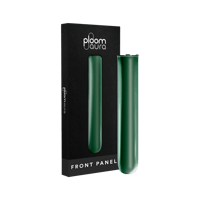
Changing the front panel on your Ploom device is quick and easy, and no tools are required.
To remove the front panel, hold your device firmly and gently pull the panel away from the edge using the small indentation. The magnetic panel will come off easily.
To attach a new panel, align it with the front of the device. The magnets will automatically guide it into the correct position. Lightly press along the edges to make sure it is securely in place.
For safety, we recommend turning off the device before changing the panel.
- What's Ploom?
- What's ActivBlend?
- What are heated tobacco products?
- What's the difference between Ploom X Advanced and other heated tobacco products?
- What are heated tobacco sticks?
- Does Ploom X Advanced produce ash?
- What's the difference between a heated tobacco stick and a cigarette or cigar?
- What's HeatFlow?
- What is Ploom AURA?
- How do I start my Ploom AURA for the first time?
- How do I use Ploom AURA?
- How do I know when my Ploom AURA is fully charged?
- What are Ploom AURA's different heating modes?
- How can I change the heating mode?
- What is Battery Saver mode and how do I activate it?
- What features are available through the app?
- How do I connect and pair my Ploom AURA with the app?
- What is Auto-Start?
- I have inserted a stick but nothing is happening, what do I do?
- Where's the button on my Ploom AURA?
- What is CleanSeal?
- What is Smart HeatFlow™?
- What do the LED lights on my AURA indicate?
- My Ploom AURA has vibrated 5 times, what does this mean?
- How do I know when a session ends?
- Can I set a safety lock on my Ploom AURA?
- How long does a session last with Ploom AURA?
- How do I remove the lock on my Ploom AURA?
- How do I reset my Ploom AURA?
- Why do I need to register my Ploom AURA?
- How do I clean my Ploom AURA?
- How do I charge Ploom AURA?
- My session has stopped during use, what's happened?
- My Ploom AURA isn't working, what do I do?
- How long does it take to charge Ploom AURA?
- What features can I access through the app?
- How can I download the app on Android?
- How can I download the app on iOS?
- Is the Ploom app free to install and use?
- What do I need to do to log in to the app?
- How can I pair my device with my phone?
- How does the Device Radar feature work and what are the limitations?
- How can I manage my consents and notifications?
- How does the lock and unlock feature work in the Ploom app?
- How many devices can I pair with the app?
- How can I disconnect or remove my device from the app?
- Why is the app asking for GPS location permissions?
- How can I receive support if I have issues with the app or my device?
- Why do I need to give notification permissions for the app? How can I configure them?
- Why is the app asking for Bluetooth permissions and Bluetooth device search permissions?
- How many sessions can I have in a row?
- How do I stop a session?
- My device is heating up, is this normal?
- Can I take Ploom X Advanced and Sobranie tobacco sticks abroad?
- Can you take Ploom X Advanced on a plane?
- Where and how can I carry my Ploom device & accessories during air travel?
- Can I pack my Ploom device in my hold luggage?
- Can I travel with my Ploom device?
- How many tobacco sticks am I allowed to travel with?
- Can I use my Ploom device on a plane?
- Why can't I use my Ploom device on the plane?
- Can I use my Ploom device at the airport?
- Can I use my Ploom device in the country I am traveling to?
- Why are Ruby Sticks unavailable?
- What are Sobranie tobacco sticks?
- What kind of tobacco blend is in my tobacco sticks?
- Do tobacco sticks have propylene glycol in them?
- Can I use Ploom tobacco sticks with other heated tobacco products?
- How do I get rid of my used tobacco sticks?
- Why isn't there an expiry date on my tobacco sticks?
- Can I use other tobacco sticks or cigarettes with my Ploom X Advanced?
- Do tobacco sticks produce tar?
- If a stick breaks and gets stuck, how do I get it out?
- My tobacco stick fits better when I push it deep into the heating chamber. Will this damage my Ploom X Advanced?
- How long do they take to cool down?
- When should I replace my tobacco stick?
- When will I need to verify my age?
- How do I claim against my warranty?
- I've forgotten my login details. What do I do?
- Why do I need to verify my age?
- How long is my warranty?
- What can the Ploom care team help with?
- If I receive a replacement Ploom device, will my warranty reset?
- What happens if I can't verify my age online?
- How do I get in touch with the Ploom Care team?
- What's Ploom Club?
- Do Ploom Points expire?
- What is the Ploom “Refer a Friend” program?
- How can I share my referral code?
- Can I transfer my Ploom points to a friend?
- Where can I find my referral code?
- What reward will I receive for referring a friend?
- I shared my referral code but haven't received points yet. Why is that?
- I received a referral code from a friend and entered it into the Ploom website. Why isn't my 10 AZN discount showing at checkout during my first purchase?
- How do the different Refer a Friend milestones work? What happens if I reach all of the milestones?
- What can I fit in a Ploom X Advanced carry case?
- Why choose Ploom X Advanced?
- Can I register multiple Ploom X Advanced devices?
- Where's the button on Ploom X Advanced?
- Is Ploom X Advanced safer than cigarettes?
- Does Ploom X Advanced produce smoke?
- Is Ploom X Advanced a vape or a cigarette?
- How do I reset my Ploom X Advanced?
- Where can I find my Ploom X Advanced serial number?
- My Ploom X Advanced isn't working. What should I do?
- Can I use another brand's sticks with my Ploom X Advanced?
- Where can I use Ploom X Advanced?
- How do I register my Ploom X Advanced?
- My Ploom X Advanced isn't charging. What should I do?
- How do I remove the Ploom X Advanced manual lock?
- How do I clean Ploom X Advanced?
- How long will my Ploom X last?
- How do I set up the Ploom X Advanced manual lock?
- What is Ploom X Advanced?
- What does Ploom X Advanced smell like?
- Where can I find my Ploom X Advanced registration code?
- How do I charge Ploom X Advanced?
- Why do I need to register my Ploom X Advanced?
- Is Ploom X Advanced waterproof?
- How does the Ploom X Advanced front panel work?
- How do I use Ploom X Advanced?
- If I take off my Ploom X Advanced front panel while using it, what happens?
- How long will it take to charge my Ploom X Advanced fully?
- How do I activate/deactivate the Auto On function on my Ploom X Advanced?
- How long does a session last?
- When I use Ploom X Advanced, the tobacco stick is moving. Is this normal?
- When should I lock Ploom X Advanced?
- Can I buy accessories for Ploom X Advanced?